

Automated Bid Follow-Up for Contractors
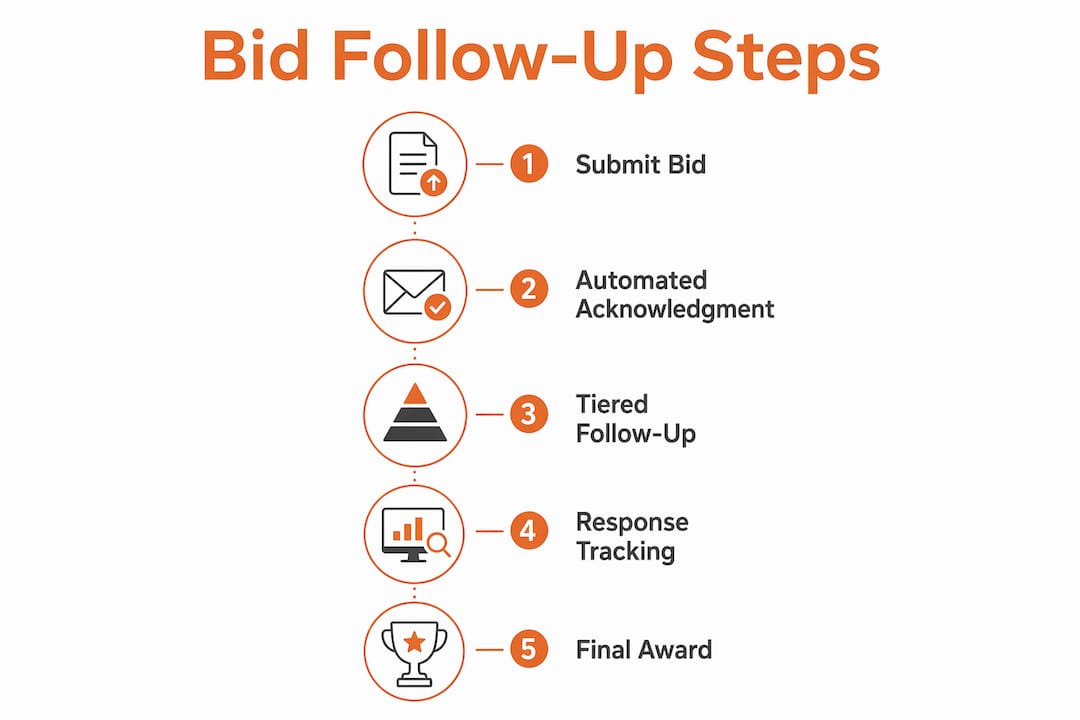
Automated bid follow-up is a CRM-driven sequence that sends professional, timed post-submission messages to GCs and owners on your behalf, so no bid goes silent after you hit send. For contractors managing dozens of active bids, the practical recommendation is simple: anchor your follow-up cadence to bid day, tier your bids by value, and let automation handle the volume while your estimators focus on the work that actually requires their judgment. OpsHUB is built on 30+ years of construction experience and designed specifically for this workflow. The Bid/No-Bid decision sits at the center of the process, and automation enforces it before a single estimating hour gets spent.
Key facts at a glance:
Consistent follow-up can significantly improve win rates without changing your price
Responding promptly raises win rates substantially; delayed responses can lower win rates considerably
Automation removes human variability across hundreds of simultaneous bids
Table of Contents
What automated bid follow-up does and why you need it
Most contractors submit a bid and wait. Top-performing firms do the opposite: they run a structured sequence of touchpoints from submission through award, and they do it consistently across every active opportunity. That consistency is what separates firms that win a small share of their bids from firms that win a much larger share.
The core functions of an automated follow-up system are:
Capture the bid submission and timestamp it in your CRM
Schedule a cadence of email and SMS touchpoints anchored to bid day
Escalate to a human when a GC replies, a deadline shifts, or a bid is marked at risk
Log every outcome, including losses, for pricing intelligence
The business case is straightforward. Responding within 24 hours noticeably improves your odds of winning. Most firms miss that window because no one owns the follow-up task. Automation closes that gap without adding headcount.
Contractors also lose bids for reasons that have nothing to do with price: missed RFIs, no acknowledgment of addenda, or simply going quiet after submission. Automation fixes all three by triggering alerts and pre-written responses the moment a status changes.
Pro Tip: Set up an automated acknowledgment that fires within one hour of every bid submission. It confirms receipt to the GC, signals professionalism, and costs your team zero time.
Core CRM features that make bid follow-up work at scale
Not every CRM is built for construction. The features below are what you actually need to run dependable follow-up across a full bid pipeline.
Status fields and pipeline stages:
Submitted, Awaiting Award, Under Review, Lost, Won
Configurable probability weights per stage for revenue forecasting
Cadence and trigger tools:
Time-based triggers anchored to bid submission date and GC bid day
Event-based triggers: addenda issued, schedule change, GC reply received
Configurable intervals (24h, 48h, 72h, 2 weeks) per bid tier
Templates and messaging:
Email and SMS templates with merge fields for project name, GC contact, and bid amount
Approval routing so senior staff can review high-value messages before they send
Integrations to prioritize:
Estimating platforms for automatic bid capture
Bid boards and public bid feeds for opportunity intake
Calendar and portal confirmations for deadline tracking
Document storage for proposal version control
Bid/No-Bid gating: Every captured opportunity should trigger a structured checklist routed to leadership before estimating begins. This single step prevents the desperation bids that drain margins and damage your reputation with GCs.
Pro Tip: Require a completed Bid/No-Bid checklist as a mandatory field before any opportunity advances to the “Estimating” stage in your CRM. If the checklist is incomplete after 24 hours, the system should flag it for a manager.

Practical follow-up workflows and timelines anchored to bid day
Tiered follow-up is the standard among high-performing subs. The logic: your best opportunities deserve human attention; automation handles the rest.
Tier | Bid Value | Cadence | Human Touch |
|---|---|---|---|
Tier 1 | High value / strategic | Automated + personal calls | Yes, at every milestone |
Tier 2 | Mid-range | Automated with personalization | At reply or 2-week mark |
Tier 3 | Low value / volume | Basic automated status checks | Only if GC replies |
Sample cadence anchored to bid day:
Day 0 (submission): Automated confirmation email. “We submitted our bid for [Project] this morning. We’re confident in our approach and happy to walk through our number at your convenience.”
Day 1–2: Automated follow-up offering value engineering. “Following up on [Project]. If a VE option would help, we have one ready to share.”
Day 3–5: Status check. “Still very interested in [Project]. Let us know if you have questions about our scope or schedule.”
Day 10–14: Decision timeline request. “Do you have a target award date? We want to make sure we can accommodate your start date if selected.”
2–3 weeks: Human-reviewed message for Tier 1 bids; automated check-in for Tier 2.
Trigger rules:
GC reply received → escalate to estimator within one hour
Bid marked “Lost” → automatically send a debrief request asking whether price, exclusions, or schedule caused the loss
Addendum issued → pause cadence, send acknowledgment, resume after updated bid is submitted
Award announced → log outcome, trigger win/loss debrief workflow
Understanding how construction bids work from the GC’s perspective helps you time these messages more precisely.
How to measure whether your follow-up is working
Tracking outcomes is what separates firms that improve from firms that repeat the same mistakes. The KPIs below give you a clear picture of ROI.
Primary KPIs:
Win rate by bid tier (Tier 1 vs. Tier 2 vs. Tier 3, tracked monthly)
Follow-up response rate (percentage of bids that generate a GC reply)
Time-to-first-response (hours from submission to first automated touch)
Conversion lift (win rate before vs. after automation, measured over 90 days)
Debrief capture rate (percentage of lost bids with a recorded debrief)
A simple funnel view in your CRM dashboard, Submission → Response → Shortlist → Award, shows you exactly where bids drop off. If you see a large drop between Response and Shortlist, your mid-cadence messages need work. If bids drop at Submission, your acknowledgment timing is the problem.
For A/B testing, run two subject line variants on your Day 3–5 email for 30 days and compare open rates. Keep the winner, test the next variable.
Use your own pre-pilot win rate and response rate as the benchmark, then compare them against your results after 90 days.
Step-by-step rollout checklist and common pitfalls
A phased rollout reduces risk. Starting with post-bid follow-up only is a valid entry point; you can expand to full pipeline automation once the cadences are proven.
Implementation order:
Map your bid capture sources (web forms, email, bid boards, direct calls)
Define Bid/No-Bid rules and build the checklist in your CRM
Build cadence templates for each tier (email + SMS)
Connect integrations: estimating tool, bid board feed, calendar
Pilot with 10 high-priority bids over 30 days
Measure win rate, response rate, and debrief capture
Iterate cadences based on results, then roll out organization-wide
Common pitfalls:
One-size-fits-all cadences that treat a $2M opportunity the same as a $50K sub bid
Skipping Bid/No-Bid gating and letting estimators price every inbound request
No assigned owner for human escalations when a GC replies
Template messages with no personalization (project name, GC contact, scope reference)
Missing compliance steps: capture SMS/email permission and maintain audit logs for every submission confirmation
Governance: Assign one person to review lost-bid debriefs monthly. The patterns in that data, price, exclusions, schedule, directly improve your next pricing cycle.
Triage and the Bid/No-Bid decision within 24 hours prevents wasted estimating effort and protects your firm’s reputation. A late ‘no’ is almost as damaging as a bad bid.
How OpsHUB enables automated bid follow-up
OpsHUB is built specifically for construction workflows, not adapted from a generic sales CRM. The platform maps directly to the features and cadences described above.
What the platform delivers:
Bid/No-Bid gating with a configurable checklist that routes to leadership for approval
Bid-day triggers and tiered cadences configurable by trade, region, and bid value
Estimating tool integrations for automatic opportunity capture
Email and SMS templates with construction-specific merge fields
Outcome logging and win/loss dashboards with debrief tracking
Custom reporting dashboards built for estimating teams, not generic sales teams
The product was developed with 30+ years of construction experience, which shows in the workflow logic. The Bid/No-Bid enforcement, the bid-day trigger structure, and the debrief automation are not bolt-on features; they reflect how estimating actually works in the field.
Users report a notable conversion lift, and onboarding includes hands-on customization of cadences to your specific trade and region. The recommended pilot approach: start with one trade or one office, run a pilot period, measure conversion lift, then expand.
How Do You Make the 72-Hour Follow-Up Count?
The automated confirmation on bid day is a courtesy. The first real follow-up is the one that lands about 72 hours, or three business days, after submission. HubSpot's guidance on follow-up timing lands on the same window: sooner reads as pushy, later lets momentum die. How you handle that touch should depend on the tier.
Tier 1: Let the CRM schedule the reminder, but have the estimator or principal write the 72-hour message by hand. Reference something specific from the scope or the site walk. If there is no reply by about day 7, pick up the phone.
Tier 2: Automation carries most of the load. If the bid is still quiet around day 15, have someone in business development make a short call instead of the estimator.
Tier 3: Send a receipt confirmation and one check-in around day 10. If nobody answers, move the bid to a quarterly re-engagement list and stop spending touches on it.
Ask a smaller question each time
Every touch after the first should ask an easier, more specific question than the last. Don't just repeat "checking in." Ask about a scope clarification, an addendum, or the decision timeline. GCs answer small, specific asks and ignore vague ones. Also, if the bid documents list an award date, add a reminder touch three to five days before that date, wherever the bid sits in the cadence.
Give one person ownership of the bid data
Automation can't fix a bad intake process. It just runs the bad process faster. For the first 90 days, name one "bid data owner" who makes sure every new bid gets a value, a submission date, a contact and a tier within 24 hours of submission. A bid with no tier or a stale contact breaks the trigger logic, and the team stops trusting the system.
Three quick wins for the next 30 days
Add a bid-tier field and tag every open bid today, before the rest of the system exists.
Pull your last 10 closed bids and note whether each one came within 5% of the winning price. That quick check shows whether pricing or project selection is your bigger problem.
Turn on one automated 72-hour follow-up this week, even if the rest of your cadence isn't built yet.
When should a person take over from the automation?
Two rollout mistakes come up again and again. The first is a single-person gatekeeper: if only one estimator knows how the cadences work, the system stalls the week that person is out. The second is over-automation: five templated touches with no human involvement on a seven-figure bid tells the GC you see them as a mail merge. When a GC asks a pricing question, raises a scope concern, or goes quiet after being responsive, stop the sequence and call. Automation handles timing and memory. People handle judgment. And log a one-line reason on every closed bid, won or lost, before you archive it, so the record of why you win and lose feeds your next estimate.
Key Takeaways
Automated bid follow-up, anchored to bid day and tiered by opportunity value, is the single most practical change a contractor can make to improve win rates without changing their price.
Point | Details |
|---|---|
Tier your bids | Apply Tier 1 (human + automated), Tier 2 (automated + personalization), Tier 3 (basic checks) to focus effort where it counts. |
Respond within 24 hours | Responding promptly raises win rates substantially; delayed responses can lower win rates considerably. |
Gate with Bid/No-Bid | Require a completed Bid/No-Bid checklist before estimating begins to prevent wasted hours on poor-fit opportunities. |
Measure conversion lift | Track win rate by tier, response rate, and debrief capture over a 90-day pilot period. |
Start with OpsHUB | Construction-specific CRM with bid-day triggers and estimating integrations. |
What most contractors get wrong about follow-up automation
The conventional wisdom says automation is about saving time. That is true, but it misses the bigger point. The real value of a structured follow-up system is that it forces discipline on decisions that most firms make emotionally: which bids to chase, how long to stay in the conversation, and when to ask for a debrief.
Firms that implement automation and then ignore the debrief data are leaving the most valuable part of the system unused. Every lost bid is a data point. Price too high on three consecutive commercial projects with the same GC? That pattern shows up in your win/loss dashboard within 60 days. Without automation logging those outcomes, you are pricing on instinct.
The other thing contractors underestimate is how much consistent follow-up changes the relationship with GC estimators. It is not about pressure. A professional check-in at Day 3 signals that you are organized and interested. That reputation compounds over time, and it shows up in invitation lists for future projects.
See how OpsHUB fits your bid workflow
Contractors who want to pilot automated bid follow-up have a clear starting point with OpsHUB. The platform comes with construction-specific cadence templates, Bid/No-Bid gating, and estimating integrations already configured for the way your team works. Onboarding includes hands-on setup and training tailored to your trade and region, so you are not building workflows from scratch.
Before your demo, ask these questions: Which estimating tools does it integrate with? How are cadences customized by bid tier? What does the onboarding timeline look like? What metrics does the dashboard track out of the box?
Run a 30-day pilot with 10 active bids, track your win rate and response rate, and compare against your baseline. The construction CRM buyer’s checklist on the OpsHUB site walks you through the full evaluation. Ready to see it in action? Book a demo and get your cadences configured for your first pilot bids.
Sources and further reading
How Home Construction Bids Work — Better Quality Builders; partner resource on bidding mechanics and digital follow-up
Related OpsHUB guides:
Automate Follow-Up for Contractor Leads: 2026 Guide — practical cadence and template guidance for contractor workflows
Bid Management Software for Contractors: A 2026 Guide — feature overview and integration guidance