
Fire Protection Installation Software for Contractors
For fire protection installation contractors, the right software setup is a construction-specific CRM paired with an inspection-capable field-service platform, one system that runs leads, quotes, inspections, deficiency tracking, and recurring billing without manual re-entry.
Start your vendor trials with these three platform classes:
OpsHUB by R.CS (R Construction Solutions) — construction-specific CRM for lead-to-quote and project workflows, with pre-built contractor templates and estimating integrations
Inspection-led NFPA platforms — built around NFPA inspection forms, device-level evidence capture, and recurring compliance scheduling
Broad commercial FSM / field-ops platforms — full-service field-service and ERP-capable systems for multi-trade contractors who need dispatch, service agreements, and accounting in one place
Why this stack? Fire protection work is compliance-driven. NFPA-aligned inspection templates, device-level capture, and deficiency tracking are table-stakes requirements, not nice-to-haves. The commercial payoff sits in converting those deficiencies into repair quotes — and that workflow is where most firms leave money on the table.
Pro Tip: Before you demo any platform, map your current deficiency-to-quote time. That single metric tells you exactly how much revenue you’re losing between inspection and repair approval.
Key Takeaways
The strongest software setup for a fire protection installation contractor combines a construction-specific CRM with an inspection-capable field platform, prioritizing deficiency-to-quote workflow and two-way accounting sync above all other features.
Point | Details |
|---|---|
Lead with deficiency conversion | Strong contractors turn a meaningful share of inspection deficiencies into paid repair work, adding revenue to every inspection visit. |
Demand live demos, not slides | Ask vendors to show a deficiency-to-quote workflow in the product before you commit to any trial. |
Plan for 3 months | Full rollout including training typically takes 3 months; budget time and cost accordingly. |
Pilot before company-wide rollout | Run a two-week pilot with one crew and one site to validate offline capture and invoice flow. |
OpsHUB for the commercial side | OpsHUB by R.CS covers lead tracking, estimating, scheduling, and reporting with construction-specific templates and hands-on onboarding. |
Next steps:
Assemble your requirements list: inspection form standards, accounting platform, crew size, and current deficiency conversion rate
Prioritize two or three pilot sites that cover both alarm and suppression work
Run side-by-side demos with your shortlisted platforms, using the five-point checklist above
Verify integrations and confirm the data migration plan before signing
Set 90-day success metrics: quote turnaround time, deficiency conversion rate, inspection on-time rate, lead response time, and user adoption rate
Pro Tip: Track deficiency conversion rate and recurring contract growth as your primary 90-day KPIs — not inspection count. Those two numbers tell you whether the software is actually moving revenue.
Table of Contents
What’s the best software for fire protection installation contractors?
OpsHUB by R.CS (R Construction Solutions) is built for contractors like you
What’s the best software for fire protection installation contractors?
Strong fire protection contractors convert a substantial portion of identified deficiencies into paid repair work, adding meaningful revenue per inspection visit. That alone justifies making deficiency-to-quote workflow your primary evaluation criterion when comparing platforms.
Vendors typically quote custom pricing after demos, and full rollouts commonly take several months including training. Budget for that timeline and ask every vendor for a two-week pilot before committing.
Pro Tip: Ask vendors to demonstrate a live deficiency-to-quote workflow during the demo — not a slide deck. If they can’t show it in the product, that feature isn’t ready.
What fire protection contractors say about these platforms
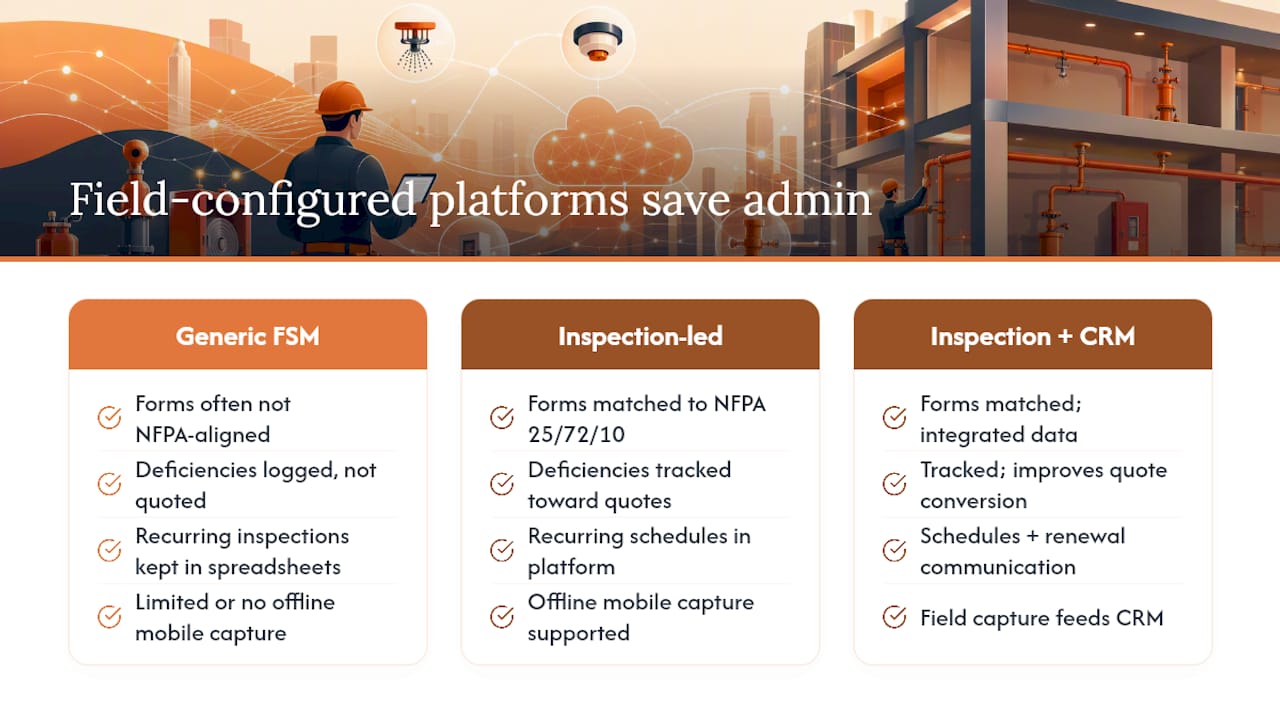
Contractors evaluating software for fire protection in buildings consistently flag the same friction points: inspection forms that don’t match NFPA 25, 72, or 10 requirements; deficiencies that get logged but never converted to quotes; and recurring inspection schedules that live in spreadsheets instead of the platform.
Firms that move to inspection-led platforms commonly find that consolidating tools into a single system designed for field realities — offline mobile capture, scheduling, and billing — saves hours per week and reduces costly scheduling and billing errors. The pattern is consistent: the admin savings are real, but they only materialize when the platform is configured for how field crews actually work, not how a generic FSM assumes they work.
Contractors using construction-specific CRMs alongside their inspection tools typically get faster lead response times and better visibility into which jobs are stalled at the quote stage. A CRM built for construction fills the gaps that inspection tools typically leave: lead capture, sales pipeline, quote and contract tracking, and customer communication around renewal cycles.
The contractors who see the fastest ROI share one habit: they measure deficiency conversion rate and recurring contract growth, not just inspection volume.
What actually matters in the first 90 days of deployment
The bottom line from working with contractors through software rollouts: user adoption decides everything. A platform with every feature you need fails if your field crew ignores it after week two.
The most common pitfalls are predictable. Mobile offline capability sounds standard until a technician is in a mechanical room with no signal and the app won’t save. NFPA form fidelity looks fine in a demo but breaks down when a field tech tries to capture device-level evidence for a suppression system. And deficiency conversion workflows that require three screens and a manual email never get used consistently.
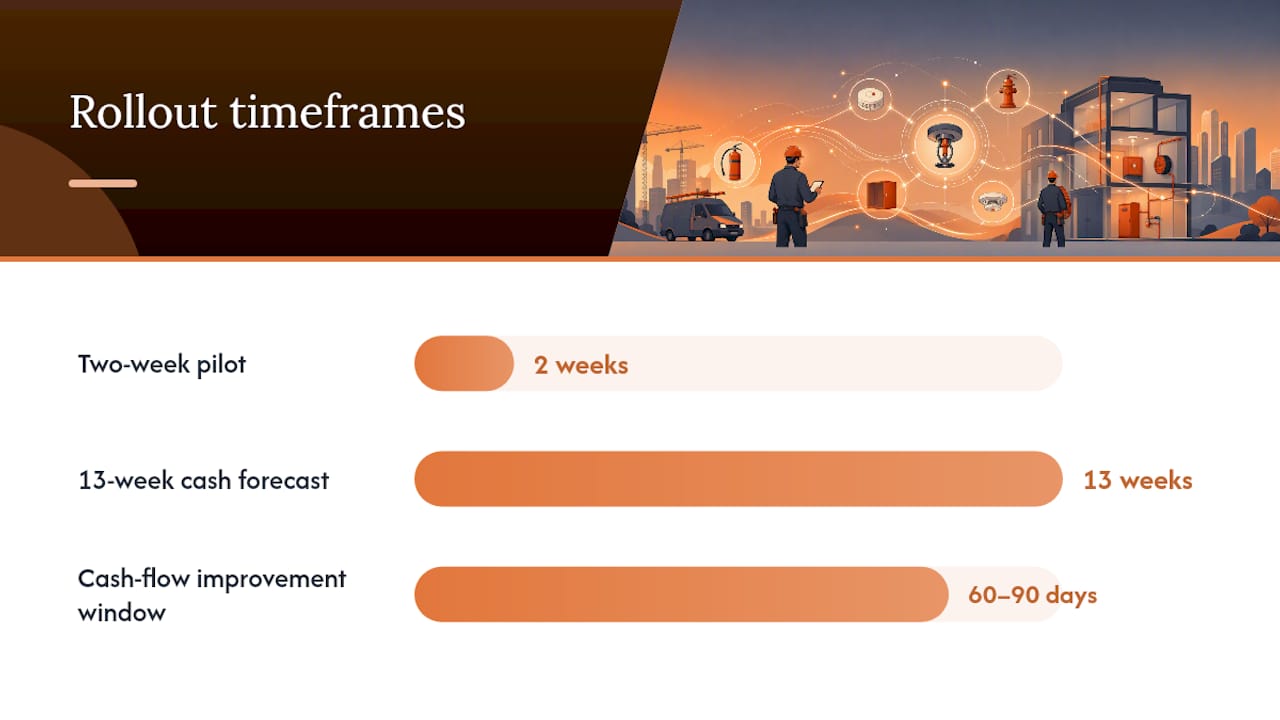
Pro Tip: Run a two-week pilot with a single crew and one site before any company-wide rollout. Validate offline capture, deficiency-to-quote time, and invoice flow in real conditions — not demo conditions.
When you’re in a demo, demand these five things:
NFPA-aligned inspection forms (25, 72, and 10 where relevant to your work)
Device-level evidence capture with photo and GPS tagging
Recurring schedule automation with technician assignment
One-click or near-instant quote generation from a logged deficiency
Two-way accounting sync with your existing accounting platform
Stitching sales, scheduling, inspection-deficiency capture, billing, and accounting into one revenue picture with bidirectional sync is what separates a system that saves time from one that creates new data-entry work. If a vendor can’t show you that sync working live, keep looking.
Cash flow is the other variable most contractors underestimate. A 13-week cash forecast, SOV restructuring, and AR collections focus typically show meaningful improvement within 60–90 days of software adoption — but only when the platform feeds accurate, real-time billing data into your financial picture.
How should fire protection contractors schedule inspections and track recurring service?
For most fire protection firms, installation work is only the start of the relationship. The steady revenue comes from inspection, testing and maintenance (ITM): the recurring visits that NFPA 25 (water-based systems), NFPA 72 (fire alarm) and NFPA 10 (portable extinguishers) require at set intervals. Building owners are responsible for that compliance, but they count on their contractor to remember the dates. A contractor who misses a due date loses the account.
A workable ITM program has four parts:
A service register for every building. List each system and device type, the governing standard, the inspection frequency (weekly, monthly, quarterly, semiannual, annual or five-year) and the date of the last completed visit.
Schedules that generate themselves. When a visit is closed out, the next one should be created automatically from the frequency, not typed in by hand.
Owner and AHJ notices. Send the building contact a reminder before each visit. After it, send a short summary they can hand to the fire marshal or authority having jurisdiction.
Deficiencies tied to the service record. Every impairment or deficiency found on an inspection should open a repair quote linked to that building, so it doesn't get lost in a technician's notes.
This is where a construction-specific CRM earns its place next to your inspection app. OpsHUB can hold each building as a contact or account record with its service dates. It can send automatic reminders to your office and the owner before inspections come due, track every open repair quote by status, and flag service agreements that are coming up for renewal. Your inspection tool captures the field data. OpsHUB keeps the schedule, the follow-up and the renewal conversation moving.
Start small. Load your top twenty recurring accounts first, confirm that every due date shows up correctly for one full quarter, and then bring the rest of your service book into the system.
OpsHUB by R.CS (R Construction Solutions) is built for contractors like you
Fire protection installation firms need more than a generic CRM. OpsHUB was built with over 30 years of construction experience and addresses the exact gaps that cost fire protection contractors revenue: slow lead follow-up, stalled quotes, and no visibility into which jobs are moving.
Here’s what OpsHUB brings to your operation:
Automated lead tracking — every inquiry captured and assigned, no leads falling through
Estimating templates built for faster, repeatable quoting
Scheduling and dispatch with multi-job management across crews
Mobile field capabilities for technicians in the field
Accounting and estimating integrations for real-time billing visibility
Custom reporting dashboards that show lead conversion, quote turnaround, and job status at a glance
Hands-on onboarding with industry-specific templates and dedicated training
Setup follows a structured onboarding process with a clear timeline so your team isn’t guessing. See the full CRM features and FAQs and book a demo to get a custom quote for your firm’s size and workflow.