

Reduce Manual Onboarding Steps at Your Construction Firm
Reducing manual onboarding steps at a construction firm is achieved by adopting automated credential tracking, digital document submission portals, and milestone-based workflows that move critical tasks before workers ever arrive on site. The industry term for this approach is onboarding automation, and it directly addresses the administrative drag that adds cost to every hire. Completing digital induction and credential verification before arrival shrinks on-site onboarding from days to a much shorter window. That shift alone changes how fast your crews and subcontractors become productive: less paperwork, fewer delays, and lower labor costs.
What manual steps slow down construction firm onboarding?
Manual onboarding in construction typically involves the same five bottlenecks, repeated across every new hire and subcontractor. Identifying them is the first step toward eliminating them.
Document collection. Paper forms, emailed PDFs, and faxed certificates arrive at different times and in different formats. Your admin team spends hours chasing submissions and reconciling inconsistencies.
Credential verification. Manually checking licenses, certifications, and insurance policies against expiration dates is time-consuming and error-prone. One missed renewal can halt site access.
Induction scheduling. Coordinating safety briefings, site orientations, and role-specific training across multiple stakeholders creates scheduling conflicts and delays mobilization.
Approval routing. Documents move from HR to field supervisors to finance, often by email. Without a defined workflow, approvals stall and workers wait.
Compliance sign-off. Confirming that every subcontractor meets your insurance minimums and regulatory requirements before mobilization requires manual cross-referencing of multiple documents.
Automation targets each of these steps directly. Digital portals collect documents in a single session. Automated workflows route approvals to the right person without manual pushes. Credential tracking flags expiration dates before they become a problem.
Pro Tip: Move document collection to a pre-arrival digital portal. Subcontractors complete submissions before they reach your site, so day one is spent working, not filling out forms.
How do digital tools and portals cut onboarding time?
The biggest time savings in construction onboarding automation come from replacing fragmented manual submissions with a single, centralized portal. Changing the document chase to a branded portal where subcontractors upload everything in one session produces the majority of cycle time reduction. This is not a minor efficiency gain. It is a structural change in how your firm processes new contractors.

Features to prioritize in onboarding software
When evaluating onboarding tools for construction, look for these capabilities:
Credential automation. The system should track license types, expiration dates, and renewal requirements without manual input.
Self-service portal. Subcontractors and new hires log in, upload documents, and track their own status. Your team reviews, not chases.
ERP and accounting integration. Data flows directly into your project management or accounting system, eliminating duplicate data entry.
Automated approval routing. Tasks auto-assign to HR, field supervisors, IT, or finance based on role and risk level.
Compliance flagging. The system identifies missing or expired documents before mobilization is approved.
What faster onboarding looks like in practice
When a contractor replaces email chains with automated credential collection, insurance verification, and compliance tracking, document collection that used to take days can happen in a single portal session, and insurance verification becomes close to immediate. That is what a governed digital process changes.
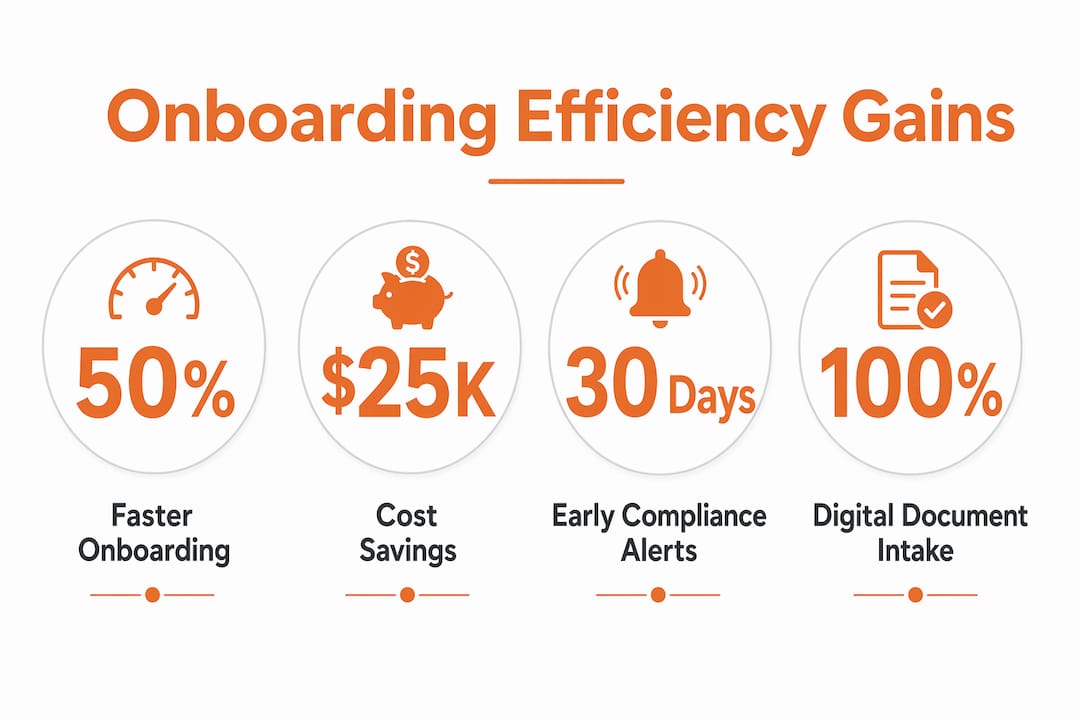
Setting service-level agreements (SLAs) inside your onboarding workflow adds another layer of control. Automated intake with defined SLA targets of 3 days for low-risk subcontractors and 10 days for bonded or legal reviews improves both speed and consistency. You stop guessing where a contractor stands and start managing to a defined standard.
Pro Tip: Brand your onboarding portal with your firm’s logo and colors. Subcontractors treat a professional portal more seriously than a generic email request, and completion rates improve noticeably.
How should you structure milestone-based onboarding workflows?
A milestone-based onboarding workflow defines exactly what needs to happen, when it happens, and who is responsible. Without this structure, onboarding becomes a series of remembered tasks rather than a managed process.
The 30-60-90 day framework is the standard approach for role-specific onboarding in construction. Here is how to apply it:
Days 1–30: Foundation. Complete all compliance and credential verification before day one. Assign a site supervisor as the primary contact. Conduct safety orientation and role-specific training within the first week. Set clear performance expectations in writing.
Days 31–60: Integration. Schedule a formal check-in at day 30 to review early performance. Identify any gaps in training or access. Confirm that all system integrations (payroll, scheduling, project management) are functioning correctly for the new hire or subcontractor.
Days 61–90: Performance review. Conduct a structured review using role-specific KPIs. Collect feedback from the worker and their supervisor. Identify any compliance renewals due within the next 90 days and trigger automated reminders.
Role-specific milestones with scheduled feedback catch issues early, avoiding costlier problems that surface at day 85 or later. The cost of a compliance failure or a poorly integrated subcontractor at month three far exceeds the time investment of a structured 30-day check-in.
KPI framework by role
Role | Key Onboarding KPIs |
|---|---|
Field laborer | Safety orientation complete, PPE issued, site access confirmed |
Subcontractor | Insurance verified, license current, compliance sign-off received |
Project manager | System access active, project assignments confirmed, 30-day review scheduled |
Office staff | Software training complete, payroll setup verified, HR documentation filed |
Onboarding automation orchestrates multi-stakeholder steps by auto-creating tasks and routing them based on role and dependencies. HR does not need to remind IT. IT does not need to remind the field supervisor. The system handles the sequencing.
Pro Tip: Schedule your 30-day check-in as an automatic calendar invite the moment a new hire or subcontractor is added to the system. Waiting until day 28 to schedule it means it often gets pushed to day 45.
How does automated compliance tracking reduce manual follow-ups?
Compliance management is where manual processes create the most risk in construction. A single lapsed certificate of insurance can expose your firm to liability and halt work on a project. Automation removes the human memory requirement from this process entirely.
Effective compliance automation for construction firms includes:
Defined insurance minimums. Set your required coverage levels in the system. Any subcontractor submission that falls below the threshold is automatically flagged before approval.
No-mobilization rules. Configure the system so that site access is not granted until compliance is verified. This removes the temptation to let someone start work while paperwork catches up.
Dual-stage expiration alerts. Automated renewal alerts at 60 and 30 days give subcontractors enough time to renew without disrupting your schedule. A single reminder at 7 days is too late.
Access control integration. Link your onboarding system to site access controls so that expired credentials automatically trigger a hold on entry until renewal is confirmed.
Document audit trails. Every submission, approval, and renewal is logged with a timestamp. This protects your firm in the event of a dispute or regulatory audit.
Automated credential tracking flags upcoming certification expiries 30 days in advance, preventing delays in re-onboarding and access changes. That proactive window is the difference between a smooth renewal and an emergency scramble that pulls your project manager off more important work.
Compliance documentation also benefits from automated ingestion and normalization. Subcontractors submit documents in inconsistent formats. A system that normalizes and classifies incoming data reduces the manual record-cleaning your admin team currently handles. Designing the portal with the subcontractor’s side in mind helps it work for both parties.
How Do You Find Where Onboarding Time Actually Goes?
Before you automate anything, map every manual step in your current process and put a rough time cost next to each one. Most managers are surprised: coordination and follow-up usually take more time than the paperwork itself.
Watch for the coordination tax
Setting up a new field supervisor or PM means HR, IT and site management all have to act. Without a shared system, each group waits on the others, and every handoff by email adds a delay. A shared checklist that assigns each task to a named person with a due date, and sends reminders when a step is late, removes most of that waiting.
Give access on day one
A new PM who can't get into scheduling or purchasing systems is idle, no matter how good they are. Trigger system access and equipment requests automatically the moment a hire is confirmed, not on their first morning. Delayed access also pushes people toward personal devices and unapproved apps to get work done. That puts project data and client contracts in places you don't control.
Collect information once
New hires often enter the same personal details on separate HR, payroll and safety forms. Each copy is another chance for an error, and each error means a correction cycle. Collect it once and let the system fill the rest.
Measure idle time
Track new-hire idle time as a formal metric in the first 30 days. A simple test: if a new hire can't do their core job within 48 hours of starting, your process has a gap worth fixing.
Fixing onboarding also protects retention. Firms often blame early turnover on bad hiring when the real cause is a disorganized first week. Fixing the process is usually cheaper than recruiting again.
Key takeaways
Automating onboarding in a construction firm requires shifting document collection earlier, deploying a centralized portal, and building structured workflows with compliance triggers and milestone reviews.
Point | Details |
|---|---|
Move tasks before arrival | Digital portals used before arrival cut on-site onboarding from days to hours. |
Use a centralized portal | One-session document uploads eliminate the fragmented email chase that delays approvals. |
Set SLAs by risk level | Define 3-day targets for low-risk and 10-day targets for bonded subcontractors to manage speed and consistency. |
Apply the 30-60-90 framework | Scheduled milestones and KPI reviews catch integration problems before they become costly. |
Automate compliance alerts | Dual-stage expiration reminders at 60 and 30 days prevent credential lapses from halting site work. |
Why onboarding automation changes more than just paperwork
I have worked with construction firms that treated onboarding as an administrative afterthought, something to get through before the real work started. That mindset is expensive. Every day a subcontractor spends waiting for credential approval or chasing a missing form is a day your project timeline absorbs the cost.
What I have seen consistently is that the firms making the fastest progress are not the ones with the most sophisticated software. They are the ones that redesigned the process first and then chose technology to support it. Dropping a digital portal onto a broken workflow just digitizes the chaos. You need governed orchestration, as described in construction workflow automation guides, with defined intake, validation, risk routing, and approvals before you automate anything.
The resistance I hear most often from project managers is that subcontractors will not use a portal. In my experience, that resistance disappears when the portal is simple, branded, and mobile-friendly. Subcontractors are not opposed to technology. They are opposed to technology that wastes their time. A well-designed portal that lets them submit everything in one session is faster than the old way, and they know it.
The other lesson I would pass on is this: do not wait for a compliance failure to justify the investment. The firms that get the most out of automation adopt it while they are not in crisis. That is the posture that separates firms that grow from firms that scramble.
— Rowena
See how OpsHUB handles this for you
If you are ready to cut the administrative load from your onboarding process, OpsHUB was built specifically for this. Developed with over 30 years of construction industry experience, it automates credential collection, routes compliance approvals, and tracks document expirations without requiring your team to manage any of it manually.
The platform integrates with your existing project management and accounting tools, so data moves where it needs to go without duplicate entry. You get custom reporting dashboards that show onboarding status by subcontractor, role, and compliance category at a glance. Explore the full CRM features and FAQs to see exactly how the automation works, or visit industries we serve to see how OpsHUB supports firms like yours.
FAQ
What does it mean to reduce manual onboarding steps in construction?
Reducing manual onboarding steps means replacing paper forms, email chains, and manual credential checks with automated digital workflows that collect, verify, and route documents without staff intervention.
How much time can automation save in subcontractor onboarding?
Automating credential collection and insurance verification moves document collection from days of email back-and-forth to a single portal session, so subcontractors are cleared to start much sooner.
What is the 30-60-90 day onboarding plan in construction?
The 30-60-90 day plan is a milestone framework that schedules compliance verification, training, performance check-ins, and KPI reviews at defined intervals to catch problems early and confirm full integration.
How does automated compliance tracking prevent site delays?
Automated systems flag certificate expirations at 60 and 30 days in advance and can block site access until renewals are confirmed, removing the risk of a lapsed credential halting project work.
What features should construction onboarding software include?
Look for credential automation, a self-service document portal, ERP integration, automated approval routing, and compliance flagging. These five features address the core bottlenecks in construction firm onboarding.