

Cutting Costs With a ServiceTitan Replacement in 2026
If you’re paying ServiceTitan’s per-technician rates plus add-on modules, the fastest way to cut that bill is switching to a contractor-focused CRM that bundles scheduling, estimating, invoicing, and lead tracking into one flat or lower-tiered price. Contractors making this move typically report significant savings on their monthly software spend, depending on team size and which modules they were paying for separately.
A 5-technician shop running ServiceTitan with add-ons often pays several hundred dollars monthly once dispatch, marketing, and reporting modules are stacked on. A consolidated replacement platform can bring that cost down substantially for the same headcount. At 15 technicians, the gap widens further because per-tech pricing compounds fast, and switching often saves several hundred dollars a month even after accounting for migration costs.
Switch now if your current platform charges separately for features you use daily (dispatch, estimating, payment processing).
Wait if you’re mid-contract with an early termination penalty that erases a full year of projected savings.
Run the ROI math first: compare 12 months of current cost against 12 months of new cost, plus a one-time migration line.
Key Takeaways
Point | Details |
|---|---|
Audit your add-on stack | List every module you currently pay for separately; that’s usually where the biggest savings hide. |
Budget for switching costs | Plan for overlap, retraining, and setup costs before you commit, not after. |
Run a parallel transition | Operate both systems for 2–4 weeks minimum to avoid lost jobs or missed invoices during cutover. |
Match category to team size | Entry-level apps fit 1–4 person crews; mid-market CRMs fit 5–30 technicians; enterprise platforms suit 50-plus. |
Consider OpsHUB | Built specifically for contractors, it consolidates dispatch, estimating, invoicing, and QuickBooks sync into one flat-priced platform. |
Table of Contents
How Do You Choose a ServiceTitan Replacement That Actually Saves Money?
Why ServiceTitan Costs Add Up and What Switching Really Saves
What Do Real Users Say About These Platforms After Switching?
Industry Perspective: What Contractors Actually Achieve by Switching
Why OpsHUB by R.CS Is Built to Cut Your Subscription Overlap
Curated Shortlist of Lower-Cost Replacement Profiles
Not every contractor needs the same replacement. A two-truck plumbing outfit and a 40-tech HVAC company are shopping for different things, even if they’re both trying to lower the same software bill. Instead of chasing brand names, it helps to think in categories, then match your business to the category that fits.
Entry-level field service apps
These tools serve solo operators and small teams who need scheduling, basic invoicing, and a mobile app without a learning curve. Pricing usually runs within a typical market range per user monthly, sometimes with a free tier for a single user. Setup is typically self-serve, allowing for rapid onboarding often within days.
Pros:
Fast onboarding, often same-day
Low monthly cost per seat
Simple mobile apps technicians actually use without training
Cons:
Limited reporting depth
Estimating tools are often basic line-item builders, not full proposal software
Integrations with accounting software can be shallow
Verdict: if you’re running a 1 to 4 person crew and just need to stop scribbling jobs on a whiteboard, this category alone might solve your cost problem.
Mid-market contractor CRMs
This is where most businesses switching away from enterprise field service software land. These platforms combine dispatch, mobile field access, invoicing, CRM pipeline tracking, and estimating in a single subscription, often with flat monthly pricing rather than a strict per-technician model. Construction-specific platforms like OpsHUB build lead tracking and reporting dashboards specifically around contractor workflows rather than adapting a generic field service template.
Pros:
Flat or tiered pricing that doesn’t punish you for adding technicians
Full workflow coverage (lead to invoice) without buying separate modules
QuickBooks and payment processor integrations included in most base plans
Cons:
Advanced reporting can lag behind enterprise platforms
Some construction-specific features (bid tracking, subcontractor communication) vary by vendor
Migration still requires real planning time, even with vendor support
Verdict: shortlist this category first if you’re a residential or light commercial contractor with 5 to 30 technicians paying enterprise prices for mid-market needs.
Enterprise field service platforms
If your operation runs 50-plus technicians across multiple locations with complex dispatch logic, an enterprise platform (ServiceTitan itself, or comparable large-scale tools) may still be the right tool despite the cost. Market review sites consistently show that large platforms trade higher price for deeper enterprise features, while smaller platforms trade some depth for lower cost and faster onboarding.
Pros:
Deep reporting and multi-location management
Built for complex commercial and franchise operations
Cons:
Per-technician pricing scales expensive fast
Long implementation timelines, often 60 to 90 days
Heavy reliance on paid add-on modules
Verdict: stay here only if your complexity genuinely requires it, not because switching feels risky.
Modular add-on stacks
Some contractors piece together a cheaper stack: a $30 scheduling app, a separate estimating tool, and QuickBooks for invoicing. It looks cheap on paper.
Pros:
Lowest sticker price per tool
Pick best-in-class for each function
Cons:
Data lives in three places, and nothing talks to anything else automatically
Technicians juggle multiple logins
Total cost often creeps close to a consolidated platform once you count every subscription
Verdict: this works for very small operations willing to manually reconcile data, but it rarely scales past a few employees without becoming a headache.
Fieldproxy and Zuper also fall into the mid-market to enterprise-adjacent range, typically pricing per user with stronger dispatch automation, while Service Fusion is often cited for its flat-rate pricing model that avoids per-technician fees entirely, a structural advantage for growing teams.
How Do You Choose a ServiceTitan Replacement That Actually Saves Money?
Picking a cheaper tool is easy. Picking one that stays cheaper after year one, and doesn’t force you to rebuild your entire workflow, takes a bit more discipline.
Start with a written list of your mission-critical workflows before you take a single vendor call:
Dispatch and scheduling for your current technician count
Mobile app functionality your crews will actually use in the field
Invoicing and payment collection speed
Estimating and proposal generation
QuickBooks or accounting software sync
Lead tracking and follow-up automation
Reporting you rely on for payroll, job costing, or forecasting
When you get vendors on the phone, ask direct questions:
What features are included in the base price, and which require an add-on module?
Is there a multi-year contract requirement, and what’s the penalty for early cancellation?
Can I export my full customer and job history in a standard format if I leave?
What does onboarding actually include: self-serve tutorials, or a dedicated migration specialist?
How often have prices increased for existing customers over the past two years?
Watch for these red flags, which reliably predict a bill that creeps back up within 18 months:
Multi-year lock-ins with automatic renewal clauses
Add-on pricing that isn’t published anywhere and requires a sales call to quote
Weak or restricted data export options, a common tactic to discourage future switching
Vague answers about implementation timelines
Use a simple three-way decision flow: keep your current platform if the capability gap is small and payback period on switching exceeds 18 months; consolidate overlapping tools if your core platform is fine but you’re paying for three extra subscriptions doing jobs it could handle natively; replace entirely if the capability gap is large and payback period is under a year.
Pro Tip: Don’t just score vendors on a feature checklist. Track how many clicks and screen switches it takes your dispatcher to book a job end to end in each demo. Operational friction, not feature count, is what actually drains hours every week.
Why ServiceTitan Costs Add Up and What Switching Really Saves
The sticker price you see when you sign up is rarely the number you end up paying eighteen months later. User reviews on G2 repeatedly point to cost stacking, meaning a base subscription plus a growing list of paid modules, as the source of unexpectedly high invoices. Review aggregates show the same pattern: the base price gets you in the door, and marketing, pricebook, or advanced reporting modules get added later at extra cost.
The full cost picture includes:
Per-technician licensing fees that scale with every hire
Add-on modules for marketing, dispatch optimization, or advanced reporting
Implementation and setup fees, often four figures for enterprise platforms
Training time for office staff and field technicians
Integration costs for accounting and payment processing
Annual price increases that compound over a multi-year relationship
Here’s a realistic scenario comparing current spend to a consolidated replacement:
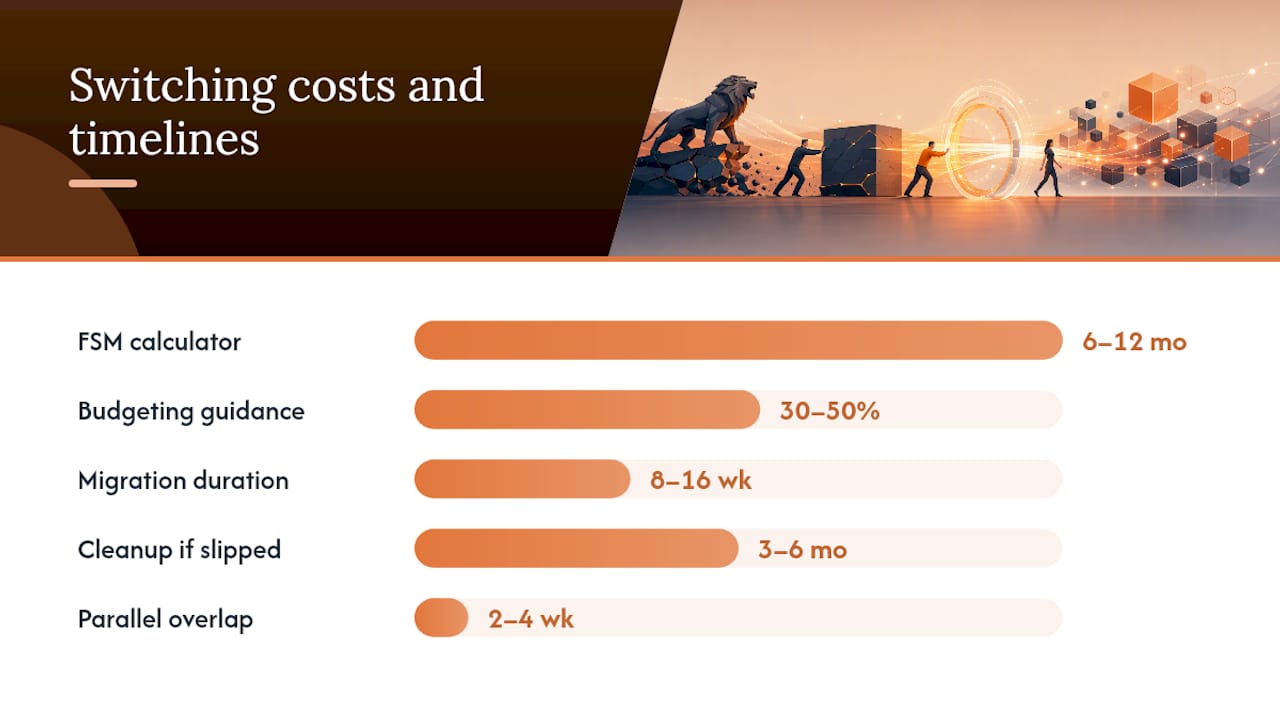
Switching isn’t free, though. Overlapping subscriptions, retraining, rebuilding integrations, and a temporary productivity dip all add up, and first-year switching costs can equal a meaningful share of the new platform’s annual price. Budget for them up front.
Run the math conservatively. Take your projected monthly savings, multiply by 12, then subtract your estimated switching cost. If that number is still positive, you have a legitimate payback case within the first year.
Pro Tip: Run both systems in parallel for at least two to four weeks rather than cutting over in a single weekend. It costs you a short overlap period on two subscriptions, but it’s far cheaper than a missed invoice or a lost lead during transition week.
Successful CRM migrations typically take 8 to 16 weeks when executed properly, and can slip into months of cleanup work when they aren’t. That gap alone is often the difference between a switch that pays for itself and one that drags on.
Which Alternative Fits Your Business Best?
Match the platform to your operation rather than picking the most familiar name.
For construction-specific businesses managing bids, subcontractor communication, and supplier relationships, a platform like OpsHUB covers ground the generic field service tools weren’t built for.
What Do Real Users Say About These Platforms After Switching?
Review platforms like G2, Capterra, and TrustRadius are the most reliable place to sanity-check a vendor’s marketing claims before you sign anything. Reading twenty recent reviews takes fifteen minutes and often reveals more than an hour-long sales demo.
Patterns worth watching for: complaints clustering around a specific module (usually pricing or reporting), praise for responsiveness during onboarding versus complaints about post-sale support, and whether reviewers mention price increases after their first renewal. Capterra’s ServiceTitan page shows this trade-off clearly. Users consistently note the platform’s depth alongside its cost, while smaller competitors trade some of that depth for faster onboarding and lower monthly bills.
Real-world performance also depends on your team’s technical comfort. A crew that’s spent five years on paper work orders will need more hand-holding than one already using a mobile scheduling app, regardless of which platform you pick.

How Does Support Quality Differ Across These Platforms?
Support availability varies more than most contractors expect going in. Enterprise platforms often provide dedicated account managers and phone support, but response times can stretch during peak season when every customer is calling at once. Mid-market platforms frequently rely more on chat and email support with published response-time targets, sometimes with faster ticket resolution simply because their support teams handle fewer enterprise-level complexity issues.
Ask directly during evaluation: what are the guaranteed support hours, is phone support included at every pricing tier or only premium ones, and what’s the average first-response time? Get this in writing, not just verbally from a sales rep.
How Do Contract Terms Affect Your Total Cost?
A low monthly price means little if you’re locked into a two-year contract with a steep early termination fee. Read the cancellation clause before you read the feature list. Month-to-month contracts cost more per seat sometimes, but they preserve your ability to leave if the platform underperforms or your business needs change.
Watch for auto-renewal clauses that silently extend your contract another year unless you cancel within a narrow window, often 30 to 60 days before renewal. Also check whether your setup and onboarding fees are refundable if you cancel within the first 90 days. A vendor confident in its product usually offers flexible terms; one that locks you in hard is often compensating for weak retention on merit alone.
Will Your Chosen Platform Scale as You Grow?
The cheapest option today isn’t automatically the cheapest option at 20 technicians. Before committing, ask how pricing changes as you add users, whether advanced features (multi-location management, franchise reporting) exist as an upgrade path or require a full platform switch later, and how the vendor has handled price increases historically for existing customers.
A platform built specifically for your industry tends to scale more gracefully than a generic tool retrofitted for contractors, because the roadmap already anticipates the features growing construction businesses need next: bid tracking, subcontractor coordination, and multi-crew scheduling.
Industry Perspective: What Contractors Actually Achieve by Switching
Contractors who migrate off enterprise platforms for cost reasons tend to report the same pattern: a rough first two to three weeks, followed by a clear efficiency gain once the team adjusts. The trade-offs are real on both sides.
Common improvements:
Faster invoicing, often same-day instead of end-of-week batching
Fewer overlapping subscriptions once marketing and scheduling tools consolidate into one platform
Lower total monthly software spend within the first billing cycle
Common setbacks:
A temporary productivity dip during the first two to three weeks as staff relearn workflows
Some advanced reporting features from the old platform aren’t available immediately, or at all
Office staff need more hands-on training than field technicians typically do
The honest takeaway: switching saves money for most mid-market contractors, but only if you budget for the adjustment period rather than expecting a seamless overnight cutover.
Why OpsHUB by R.CS Is Built to Cut Your Subscription Overlap
If you’ve read this far, you’ve already seen how much money hides in add-on modules and stacked subscriptions. OpsHUB was built specifically to eliminate that stacking for contractors, consolidating scheduling and dispatch, flat-price estimating, invoicing, QuickBooks sync, and lead tracking into one platform instead of five separate tools billing you separately every month.
Because it’s built around construction workflows rather than adapted from a generic field service template, you get bid tracking, subcontractor communication, and supplier coordination without buying a bolt-on module for each one. Onboarding includes structured training support rather than a self-serve video library and a hope you figure it out. You can review the full breakdown of what’s included on the CRM features and FAQ page, and see how the platform maps to your specific trade on the industries we serve page. The next step is simple: run your own ROI math using the switching-cost guidance above, then book a demo to see how many of your current subscriptions this one platform could replace.
What Does a Clean Switch Look Like, Step by Step?
The savings only show up if the cutover goes cleanly. Whatever platform you move to, these steps keep a switch from turning into months of cleanup.
1. Export before you give notice
While you still have full access, export your customer list, job history, open estimates, accounts receivable balances, price book, service agreements or memberships, and equipment records. Confirm the export formats your new platform can import. Then clean and standardize the data before you import it. Bring active customers and recent history in first.
2. Rebuild the price book first
An incomplete price book is the most common reason a go-live slips. Finalize your services, materials and equipment, with each one linked correctly, before technicians touch the new system. Otherwise they'll start typing manual line items in the field, and the habit sticks.
3. Lock in accounting and payments up front
Choose your accounting integration before setup starts, not in the final week. Your goal is transactions that sync automatically, with no rekeying. Set up payment processing early too. Card payments that don't auto-match to bank deposits turn into daily manual reconciliation.
4. Give every role a lane
Role | Owns during the switch |
|---|---|
Owner or operations lead | Final decisions on job types, business units and price book structure, plus the internal project lead role |
Office manager | Data cleanup, customer record accuracy and AR balance checks |
Dispatcher | Dispatch board setup, zones, skills and capacity rules |
CSRs | Practice booking calls and give feedback on the intake workflow |
Field technicians | Run a full practice job in the mobile app, from dispatch to payment |
Bookkeeper or accountant | Integration setup and the first export check |
5. Keep a running issue list during go-live week
Start a shared issue list on go-live day and log every question and setup problem as it comes up. Review it daily with whoever is supporting your setup. Run your first accounting export within a few days of cutover to confirm the financial sync works before month-end.
6. Watch five numbers for the first 30 days
Booking rate: are calls turning into scheduled jobs at your usual rate?
Dispatch speed: how quickly do jobs move from booked to dispatched to complete?
Price book usage: are techs picking from the price book or creating manual line items?
Collection at the job site: what share of invoices get paid on the spot?
Accounting sync errors: are exports landing without exceptions?
If any of these slips from your old baseline, it's usually a training or setup gap, not a platform problem. Fix it in the first month, before workarounds become habits.
Frequently Asked Questions
How much can a ServiceTitan replacement actually reduce subscription costs?
Is switching worth it for a small, 5-technician shop? Often yes, especially if you’re paying for marketing or reporting add-ons on top of a base subscription. The math tends to favor smaller teams because switching costs are lower in absolute dollars even though the percentage overlap period is similar.
How long does migrating to a new field service platform take? Structured migrations typically take 8 to 16 weeks when planned properly, though SMB platforms can go live in 2 to 4 weeks with self-serve data imports, while enterprise migrations often run 60 to 90 days with dedicated migration teams.
What’s the biggest hidden cost when switching CRM platforms? Running two systems in parallel during transition, plus the temporary productivity dip while staff relearn workflows.
Should I migrate all my historical data or start fresh? Clean and standardize your legacy data into templates before importing rather than moving everything over as-is. The “import everything” approach is one of the most common causes of messy post-migration cleanup.