

Why Contractors Need More Than Buildertrend in 2026
Buildertrend is a genuinely strong platform for residential general contractors and custom home builders. Its Selections module is best-in-class, the client portal drives close rates, and its over 1 million users globally since 2006 confirm it earned its market position. But for a growing number of contractors, Buildertrend alone is not enough. Pricing structure, data portability, accounting integration, and field adoption are the main reasons contractors look beyond a single platform.
Here is what drives that search:
Data portability: There is no native bulk export, so moving years of project history to another system takes planning.
Cost planning: Pricing is quote-based rather than published, so budget for renewals when you compare options.
Accounting integration: Job costing depends on a clean QuickBooks sync, so test that sync with your own data before you rely on it.
Field adoption: If the mobile workflow feels heavy to your crews, they stop logging data and project records become incomplete.
Integration needs: Specialty contractors and insurance restoration firms should confirm the integrations they depend on (photo documentation, insurance estimating, aerial measurement) before committing.
Scalability friction: More projects add complexity the platform was not designed to absorb cleanly for commercial or high-volume operations.
The contractors who thrive in 2026 are not necessarily the ones who replaced Buildertrend. They are the ones who understood what it does well, identified where it falls short for their specific operation, and built a connected software stack around those realities.
Why contractors look beyond Buildertrend: strengths and real limitations
Buildertrend’s competitive moat comes down to one feature: the Selections module. It lets homeowners pick every cabinet, fixture, paint color, and finish before trades start. For custom home builders, that is not a convenience feature. It is a sales asset. Builders who run selections through Buildertrend report real time savings per project by cutting coordination friction.

The client portal, AI Client Updates (shipped june 2025), and AI Bill Pay (announced at IBS Orlando in early 2026) are real, shipped features with measurable time savings. For 5–50 person residential firms selling design-heavy work, Buildertrend earns its price.
The problems surface when contractors grow past that sweet spot.
Where Buildertrend breaks under pressure
Pricing and cost planning. Pricing is quote-based rather than published, and renewal terms are worth reviewing carefully. Buildertrend Bill Pay carries per-transaction fees, so model them against your annual client payment volume before you commit.
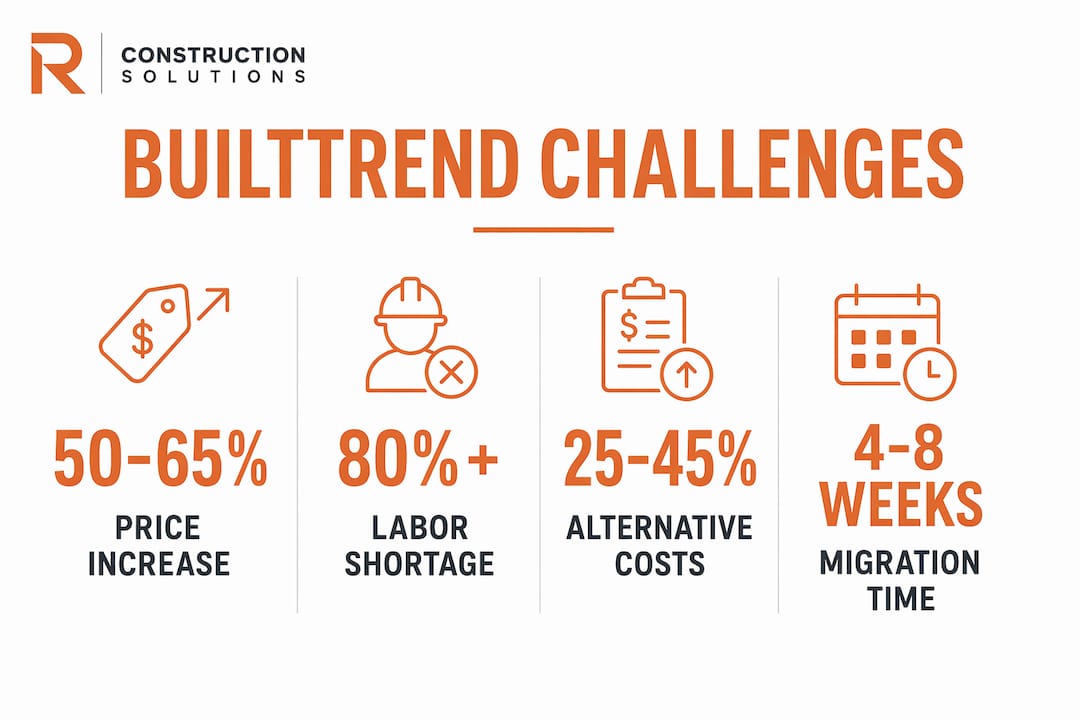
Data portability. There is no native bulk export. Project documents, photos, and daily logs can generally be exported one file at a time, but financial history, client communication threads, and selections data are significantly harder to migrate. Most contractors attempting a switch end up doing a clean-start migration with archived access to the old platform, a process that typically requires 4–8 weeks of parallel operation.
Accounting integration. Job costing is only as reliable as the QuickBooks sync behind it. Test the sync with your own data during evaluation so your office staff are not left correcting financial records by hand.
Statistic callout: Rework eats a meaningful share of total project value when the field and the office work from different versions of the same drawing or spec. Better project controls are not optional at that margin pressure.
Field adoption. Complex workflows with too many steps for simple tasks can push field crews away from the app. When the field opts out, the data becomes incomplete, and the system loses its value as a source of truth.
Integration needs. Buildertrend works best as a self-contained hub with QuickBooks Online as the accounting backbone. Specialty contractors and insurance restoration firms should confirm that the photo documentation, insurance estimating, and measurement tools they depend on connect cleanly before committing.
Solo contractors and crews of 1–3 people find pricing prohibitive relative to what they actually use
Specialty roofing with insurance restoration workflows has no Xactimate path inside Buildertrend
Commercial GCs running $20M+ projects need Procore-level subcontractor coordination and AIA billing workflows
Contractors who need transparent, published pricing before talking to sales are frustrated by the demo-gated model
A large majority of construction firms report difficulty finding skilled workers, according to Associated General Contractors workforce surveys. That pressure, combined with rework costs and owner demands for digital submittals, means the firms that thrive are treating software as an operational discipline, not just a subscription.
What to look for beyond Buildertrend
The right next step depends entirely on your project type, team size, and the specific gap your current platform leaves in your operation. Start with the evaluation criteria below rather than a list of brand names.

Pro Tip: Before evaluating any alternative, export everything you can from Buildertrend first. Financial history and selections data are the hardest to migrate. Budget 4–8 weeks for a proper transition including parallel operation, and treat that time as a real project cost.
For a broader look at construction CRM options beyond Buildertrend, the landscape in 2026 includes more purpose-built tools than at any prior point.
How contractors can choose the right software beyond Buildertrend
The most common mistake contractors make when evaluating software is leading with features. The right starting point is your operation’s actual failure points. Where does data get stuck? Where do field crews stop using the system? Where does your accounting team spend hours on manual corrections?
Key criteria for a real evaluation
Business size and project type: Buildertrend is built for residential contractors with a steady volume of design-heavy projects. Smaller operations and commercial GCs should weigh platforms sized for their volume and delivery method.
Integration needs: Map every tool your team currently uses and verify native integration before committing to any platform.
Total cost of ownership: Subscription price is only part of the cost. Add onboarding time, training hours, migration effort, and any per-transaction fees. Per-transaction payment fees add up fast at volume.
Data portability: Ask every vendor directly: can you export all project data, financial history, and client communications in a machine-readable format? If the answer is vague, treat that as a red flag.
Scalability: A platform that works for 10 projects per year may break at 40. Test with your actual project volume, not a demo scenario.
The single-spine principle
Stack sprawl is a common cause of failed automation rollouts. Buying several overlapping project, field, and photo tools in the same year creates a data consistency problem that no individual tool can solve. The firms that outperform their peers enforce a single-spine discipline: one project management tool, one field operations tool, and one accounting platform, connected deliberately.
That does not mean using fewer tools. It means choosing tools that connect cleanly and assigning each a defined role. Your project management platform is the system of record. Your field tool feeds it daily. Your accounting platform receives job-cost data from both.
Reducing manual onboarding steps is one of the fastest ways to improve adoption. The more complex the software, the longer the retraining cycle, and the higher the risk that field crews opt out entirely. Minimizing that friction from the start is as important as the feature set itself.
Evaluating customer support and training
Ask for references from contractors in your specific segment, not just the vendor’s showcase clients.
Verify whether implementation support is included or billed separately.
Check whether the vendor offers a free trial or pilot so you can test real workflows before committing.
Review G2 and Capterra ratings for customer service specifically, not just overall score.
Migration planning
Switching software typically requires 4–8 weeks for a proper migration including data export, new platform setup, team training, and parallel operation. Never switch mid-contract if you can avoid it. The disruption cost rarely pencils out against the savings until the new platform is fully adopted. If your team is trained and using Buildertrend consistently, that adoption has real value. Factor it into the decision.
For contractors evaluating commercial construction software specifically, the criteria shift toward subcontractor coordination depth, AIA billing, and document control rather than client-facing portals and selections workflows.
What experts say about managing your contractor software stack
The construction industry has been the slowest major sector to digitize. The firms pulling ahead in 2026 are not the ones with the most software. They are the ones with the most connected software.
Construction operations advisors point to stack sprawl as a primary cause of lost efficiency. The recommended fix is the single-spine approach: one project management tool, one field operations tool, one accounting platform, connected deliberately rather than accumulated reactively.
Statistic callout: Construction firms are competing for skilled crews as much as for projects, according to Associated General Contractors workforce surveys. Software that field crews actually use is not a preference. It is a prerequisite.
The monetary subscription price is only part of what contractors pay. Continuous retraining and onboarding demands created by complex software suites reduce operational productivity in ways that rarely appear in a software ROI calculation. Every time a platform updates its UI or adds a feature layer, someone on your team loses productive hours relearning a workflow they had already mastered.
Operational strategists in the construction technology space stress that software value lies in data openness. A platform that holds your project history in a proprietary format and makes bulk export difficult is not a tool you own. The most successful firms treat their primary project management platform as a data repository and layer orchestration on top to connect field and accounting systems, keeping data flowing and avoiding vendor lock-in.
Pro Tip: When evaluating any platform, ask the vendor to walk you through a full data export of a completed project, including financial history, client communications, and all attachments. If they cannot demonstrate it in 15 minutes, budget extra weeks for your eventual migration.
The orchestration mindset accepts that no single platform does everything well. Each tool should own one clear role, and the connections between them matter as much as the tools themselves. Connecting specialists cleanly beats forcing one platform to do everything.
For contractors exploring why construction-specific tools outperform generic solutions, the answer comes down to data flows. A generic CRM does not know what a change order is. A generic project management tool does not understand lien waivers. Purpose-built tools carry that domain logic natively, which means less configuration, fewer errors, and faster adoption by crews who recognize the workflows from day one.
Can You Run a CRM Alongside Buildertrend?
Yes, and for many contractors that is the cleanest setup. Buildertrend is built around post-contract work: selections, schedules, client updates and job execution. A dedicated construction CRM is built around pre-contract work: capturing leads, following up, tracking bids and winning the job. Using each for what it does best follows the same single-spine idea covered above. Each tool gets one clear role.
How the handoff should work
Marketing captures the lead, and the CRM records the source.
The CRM qualifies the lead, runs follow-up and tracks the bid through revisions.
When the contract is signed, client details, scope notes and contract value move to the project management system automatically.
From that point, the project management system is the system of record for the job.
If anyone has to retype information between steps 3 and 4, that link will break sooner or later. Test it before you commit.
Pre-contract features to look for
Lead source tracking, so you know which marketing actually produces signed work
Instant response tools, such as missed-call text-back and automated first replies
Bid status and follow-up dates for every open proposal
Win/loss reporting, including by general contractor for specialty subs who bid many jobs a month
A visual pipeline board once you have more than a handful of bids open at once
Are you ready for a CRM?
A CRM improves results when two things are already true: you have a repeatable sales process with defined follow-up steps, and one person is accountable for lead response. If neither is true yet, standardize the process first. Software automates a process. It cannot invent one.
Key Takeaways
Buildertrend is the right platform for a specific contractor profile. Outside that profile, data portability, pricing, integration depth, and field adoption are the factors to weigh before choosing a platform or a connected multi-tool stack.
Point | Details |
|---|---|
Buildertrend’s core strength | The Selections module reduces coordination friction for custom builders. |
Pricing and cost planning | Pricing is quote-based; model renewals and per-transaction Bill Pay fees against your payment volume. |
Data portability gap | No native bulk export means migration typically requires several weeks and often results in a clean-start rather than a full data transfer. |
Single-spine discipline | Firms that enforce one project management tool, one field operations tool, and one accounting platform outperform those with tool sprawl. |
OpsHUB | Built with 30+ years of construction experience, it addresses the CRM and lead-tracking gaps Buildertrend leaves, with automated workflows and custom reporting tailored to contractors. |
The real cost of picking the wrong platform
Most contractors evaluate software by its feature list. That is the wrong lens. The feature list tells you what the platform can do in a demo. It does not tell you what your field crew will actually use at 6 AM on a job site, how your office manager will handle accounting sync issues, or what happens to five years of project history when you outgrow the platform and need to leave.
Buildertrend is a genuinely excellent platform for the contractor it was built for: a residential general contractor or custom home builder with 5–50 employees, $1M–$25M in annual revenue, and a business model where the homeowner experience drives referrals and close rates. The Selections module is not a feature. It is a competitive moat. If that description fits your operation, Buildertrend earns its price.
But the construction industry in 2026 is not a single segment. It is roofing contractors who need insurance estimating workflows. It is commercial GCs who need AIA billing and subcontractor compliance tracking. It is solo operators who need lightweight, low-cost estimating tools. It is growing mid-market firms that need their project management platform, their field tool, and their accounting system to share data without a human manually reconciling them every week.
The contractors I see struggle most are not the ones who chose the wrong platform. They are the ones who chose a platform and then tried to make it do everything, long past the point where it was clearly failing them. They added workarounds. They hired someone to manage the workarounds. They paid for integrations that half-worked. They watched their field crews stop logging data because the app was too slow or too complicated. And they kept paying the annual contract because switching felt harder than staying.
Switching is hard. But staying on a platform that your team has stopped using is not a solution. It is just a more expensive version of the same problem.
The right approach is not to find the perfect platform. It is to find the right spine for your dominant project type, connect it deliberately to your field and accounting tools, and enforce that discipline across every project. That is what the firms outperforming their peers are doing in 2026.
OpsHUB fills the gap Buildertrend leaves on the CRM side
Buildertrend manages projects well. What it does not do is manage your pipeline, automate your lead follow-up, or give you a reporting dashboard that connects lead conversion to project revenue. That gap is where contractors lose money quietly, not on job costs, but on the leads that went cold because no one followed up, or the referrals that never converted because the proposal process was too slow.
OpsHUB was built with over 30 years of construction experience specifically to address that gap. It offers automated lead tracking, custom reporting dashboards tied to construction workflows, and integration with the industry-specific tools contractors already use. Automated follow-up sequences replace the manual outreach most contractors never get around to. For mid-market contractors who have their project management covered but are losing revenue at the front end of the pipeline, it is a direct answer to a real problem. See the full range of contractor solutions OpsHUB supports across construction segments.